[three.js][typescript] - Camera(1)
Camera는 Scene(장면)을 어떤 시점에서 볼 지 결정하는 중요한 요소이며, 그림자를 생성하는 매우 핵심적인 요소이다. Three.js에서 제공하는 기본적인 카메라는 다음과 같이 PerspectiveCamera, Orthograph
yoohwanihn.tistory.com
이전 글에선 Three.js가 제공하는 Perspective Camera에 대해 알아보았다.
이어서 Orthographic Camera에 대해 알아보자.
Orthographic Camera
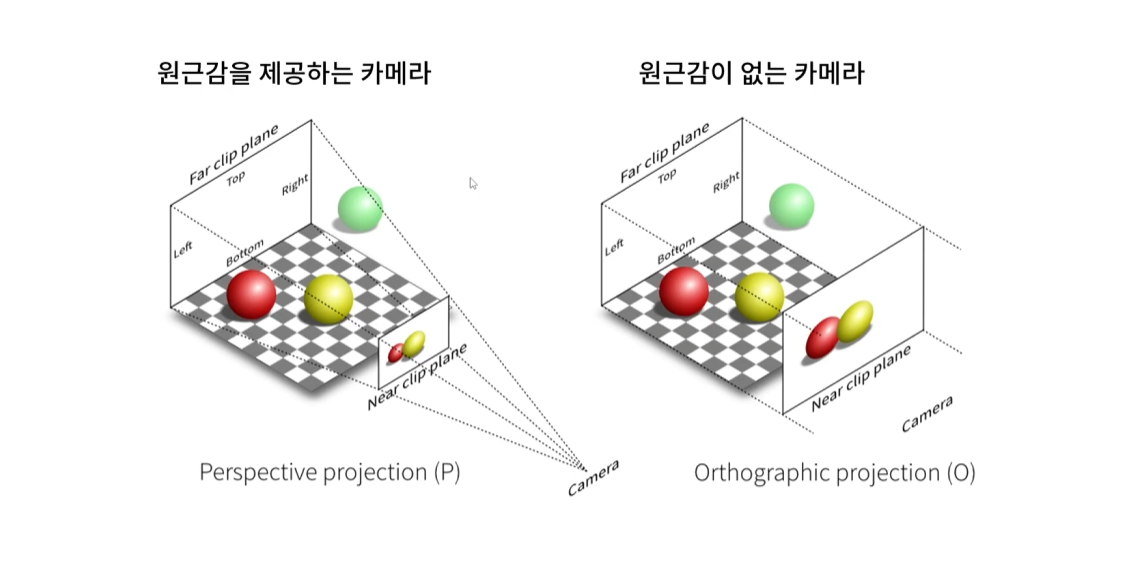
Orthographic Camera는 장면의 원근감을 표현하지 않는 카메라다.
크기가 동일한 구체 2개를 화면에 렌더링 할 때 거리에 상관없이 늘 동일한 크기의 구체 2개가 렌더링 될 것이다.
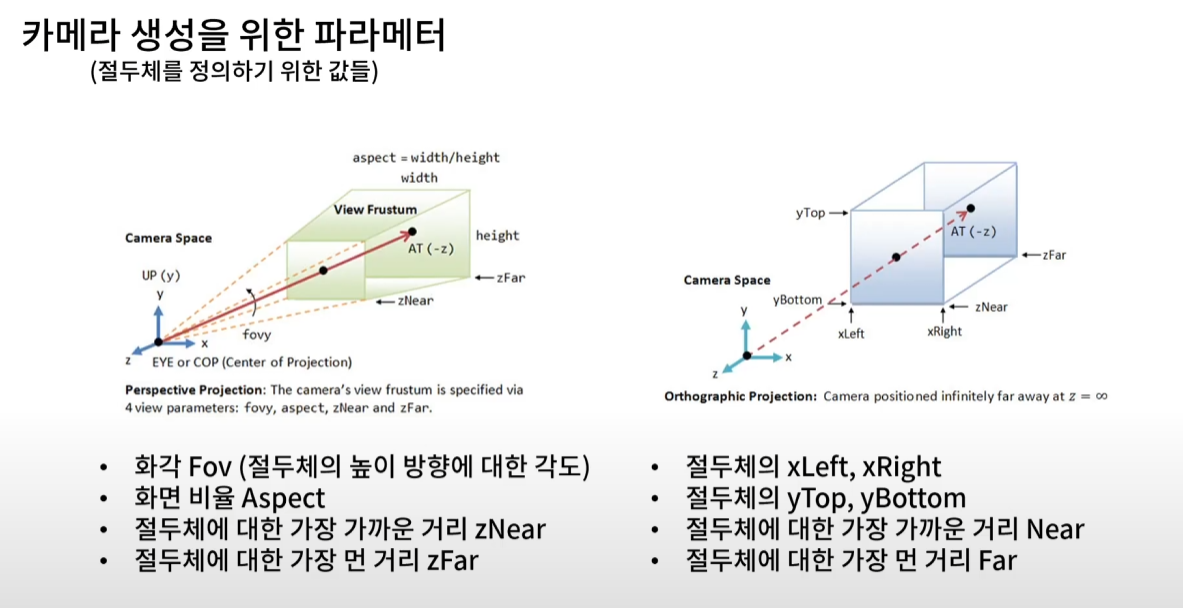
오쏘그래픽 카메라는 Perspective Camera와 다르게 6개의 파라미터를 받는다.
오쏘그래픽 프로젝션 사진에서 파란색의 육면체가 Perspective Camera의 절두체와 같은 개념이다.
절두체와 마찬가지로 Orthographic Camera는 육면체 안에 있는 물체만 렌더링 된다.
Orthographic Camera는 이 육면체를 정의하기 위해 6개의 값이 필요하다.
먼저, xLeft와 xRight이다. Camera Space에서 AT를 가로지르는 중심 점을 원점으로 했을 때 수평축에 대한 좌표값이다.
위 사진상에서 xRight는 음수, xLeft는 양수가 될 것이다.
두 번째로 yTop, yBottom이다. 마찬가지로 똑같은 점을 원점으로 했을 때 수직 방향에 대한 좌표값이다.
yBottom은 음수이며, yTop은 양수가 될 것이다.
그리고 zNear와 zFar와 동일한 개념의 Near와 Far가 있다. 이 부분은 Perspective Camera와 똑같은 개념이다.
개념으로만 보면 감이 잘 안 잡히니까 코드로 직접 실행해 보자.
import { OrbitControls } from 'three/examples/jsm/Addons.js'
import './style.css'
import * as THREE from 'three'

class App {
  private renderer: THREE.WebGLRenderer //Renderer Field 추가
  private domApp: Element
  private scene: THREE.Scene
  private camera?: THREE.OrthographicCamera //?를 붙이면 PerspectiveCamera Type이나 Undefined Type을 가질 수 있음.(Optional Properties)

  constructor(){
    console.log("YooHwanIhn");
    this.renderer = new THREE.WebGLRenderer({antialias:true}) // 안티-알리아스 : 높은 렌더링 결과를 얻기 위해 픽셀 사이에 계단 현상을 방지하는 효과 추가
    this.renderer.setPixelRatio(Math.min(2, window.devicePixelRatio)) // 고해상도에서 깨짐 방지를 위해 픽셀 비율 지정

    this.domApp = document.querySelector('#app')!
    this.domApp.appendChild(this.renderer.domElement) // renderer.domeElement : canvas Type의 DOM 객체

    this.scene = new THREE.Scene()

    this.setupCamera()
    this.setupLight()
    this.setupModels()
    this.setupEvents()
  }

  private setupCamera(){
    const width = this.domApp.clientWidth
    const height = this.domApp.clientHeight


    const aspect = width / height
    this.camera = new THREE.OrthographicCamera(
      -1*aspect, 1*aspect,  // xLeft, xRight
       1, -1, // yTop, yBottom
        0.1, 100  // zNear, zFar
    )
    this.camera.position.set(2, 2, 3.5)  // (2, 2, 3.5)

    this.camera.lookAt(new THREE.Vector3(0, 0, 0))

    //new OrbitControls(this.camera, this.domApp as HTMLElement)
  }

  private setupLight(){
    //빛의 색상 값과 빛의 강도
    const color = 0xffffff  // white
    const intensity = 1
    const light = new THREE.DirectionalLight(color, intensity)  //광원
    light.position.set(-1, 2, 4)

    this.scene.add(light)
  }

  private setupModels(){
    const axisHelper = new THREE.AxesHelper(10) // 좌표축
    this.scene.add(axisHelper)

    const geomGround = new THREE.PlaneGeometry(5, 5) // ground (5x5)
    const matGround = new THREE.MeshStandardMaterial({
      color: "#2c3e50",
      roughness: 0.5,
      metalness: 0.5,
      side: THREE.DoubleSide
    })
    const ground = new THREE.Mesh(geomGround, matGround)
    ground.rotation.x = -THREE.MathUtils.degToRad(90)
    ground.position.y = -.5
    this.scene.add(ground)

    const geomBigSphere = new THREE.SphereGeometry(1, 32, 16, 9, THREE.MathUtils.degToRad(360), 0, THREE.MathUtils.degToRad(90))
    const matBigSphere = new THREE.MeshStandardMaterial({
      color: "#ffffff",
      roughness: 0.1,
      metalness: 0.2
    });
    const bigSphere = new THREE.Mesh(geomBigSphere,matBigSphere)
    bigSphere.position.y = -.5
    this.scene.add(bigSphere)

    const geomSmallSphere = new THREE.SphereGeometry(0.2)
    const matSmallSphere = new THREE.MeshStandardMaterial({
      color: "#e74c3c",
      roughness: 0.2,
      metalness: 0.5
    })
    const smallSphere = new THREE.Mesh(geomSmallSphere, matSmallSphere)

    const smallSpherePivot = new THREE.Object3D();
    smallSpherePivot.add(smallSphere)
    bigSphere.add(smallSpherePivot);
    smallSphere.position.x = 2
    smallSpherePivot.rotation.y = THREE.MathUtils.degToRad(-45)
    smallSphere.position.y = 0.5 // bigSphere의 y position이 -.5기 때문에
    smallSpherePivot.name = "smallSpherePivot"  // update에서 접근하기 쉽게 명명함

    const cntItems = 8
    const geomTorus = new THREE.TorusGeometry(0.3, 0.1)
    const matTorus = new THREE.MeshStandardMaterial({
      color: "#9b59b6",
      roughness: 0.5,
      metalness: 0.9
    })
    for(let i=0; i<cntItems; i++){
      const torus = new THREE.Mesh(geomTorus, matTorus)
      const torusPivot = new THREE.Object3D() // Torus 역시 반 구를 기준으로 회전하면서 8개를 생성하기 때문에 피봇이 필요함
      bigSphere.add(torusPivot)

      torus.position.x = 2  // smallSphere의 x 포지션과 일치하게함
      torusPivot.position.y = 0.5 // bigSphere의 y 포지션이 -.5임
      torusPivot.rotation.y = THREE.MathUtils.degToRad(360) / cntItems * i
      torusPivot.add(torus)
    }
  }

  //실제 이벤트와 렌더링 처리를 다룰 메서드
  private setupEvents(){
    window.onresize = this.resize.bind(this); // html의 size가 변경될 때마다 호출되는 함수(addEventListener 느낌??)
    this.resize();

    this.renderer.setAnimationLoop(this.render.bind(this)) // 연속적으로 render 메서드 호출(모니터 Frame에 맞게)
  }

  // html창 resize시 호출할 함수
  private resize(){
    const width = this.domApp.clientWidth
    const height = this.domApp.clientHeight

    //앞선 setUpCamera에서 설정한 camera 정보를 다시 수정해줌.
    const camera = this.camera
    if(camera){
      camera.aspect = width / height
      camera.updateProjectionMatrix() // 카메라의 값이 변경되었다면 수정하도록 함.
    }

    //renderer도 마찬가지로 사이즈 수정함
    this.renderer.setSize(width, height)
  }

  private update(time: number){
    time *= 0.001 // ms -> s 단위로 변경

    const smallSpherePivot = this.scene.getObjectByName("smallSpherePivot")
    if(smallSpherePivot){
      smallSpherePivot.rotation.y = time;
    }
  }

  private render(time: number){
    // time : setAnimationLoop의 값에 의해서 결정되는데 단위는 ms
    this.update(time)

    this.renderer.render(this.scene, this.camera!)
  }
}

new App()
기존의 Perspective Camera와 관련된 필드와 setupCamera 함수의 코드를 수정해 보았다.

aspect는 DOM상의 가로의 길이를 세로로 나눈 값이다.
종횡비를 설정한 이유는 자연스러운 결과를 도출하기 위함이며,
종횡비(aspect)를 이용해 xLeft, xRight를 설정해 주고 나머지 인자 역시 설정해 주었다.
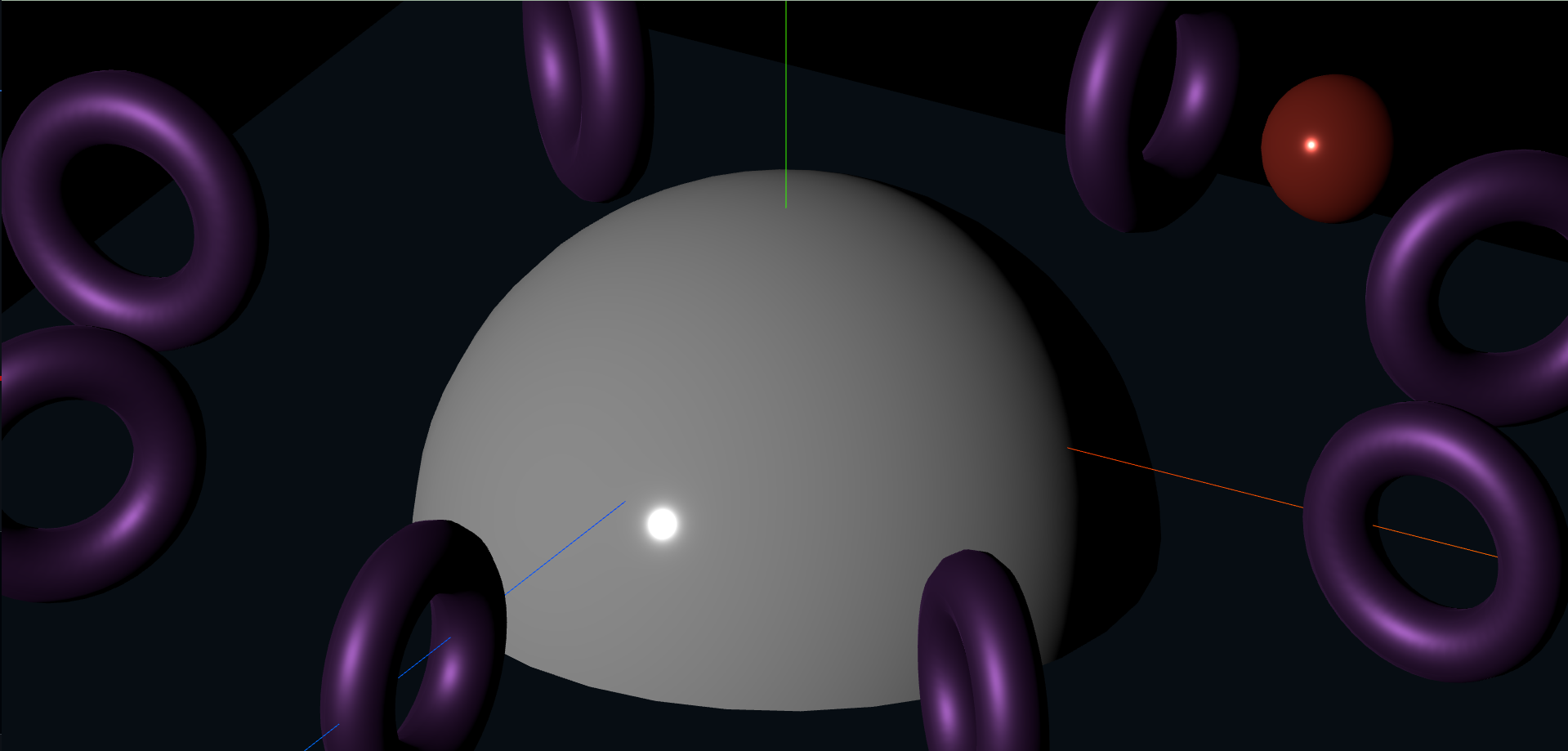
그 결과는 매우 크게 렌더링 된 모습이다.
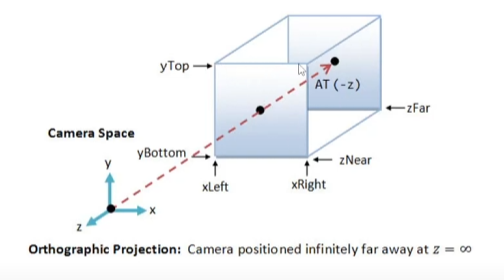
이는 Orthographic Camera의 절두체에 해당하는 파란색 직육면체에서
카메라에서 보이는 면에 대한 크기가 작기 때문이다.

위와 같이 xLeft, xRight, yTop, yBottom을 각각 5배씩 늘려서 면을 키워주었다.
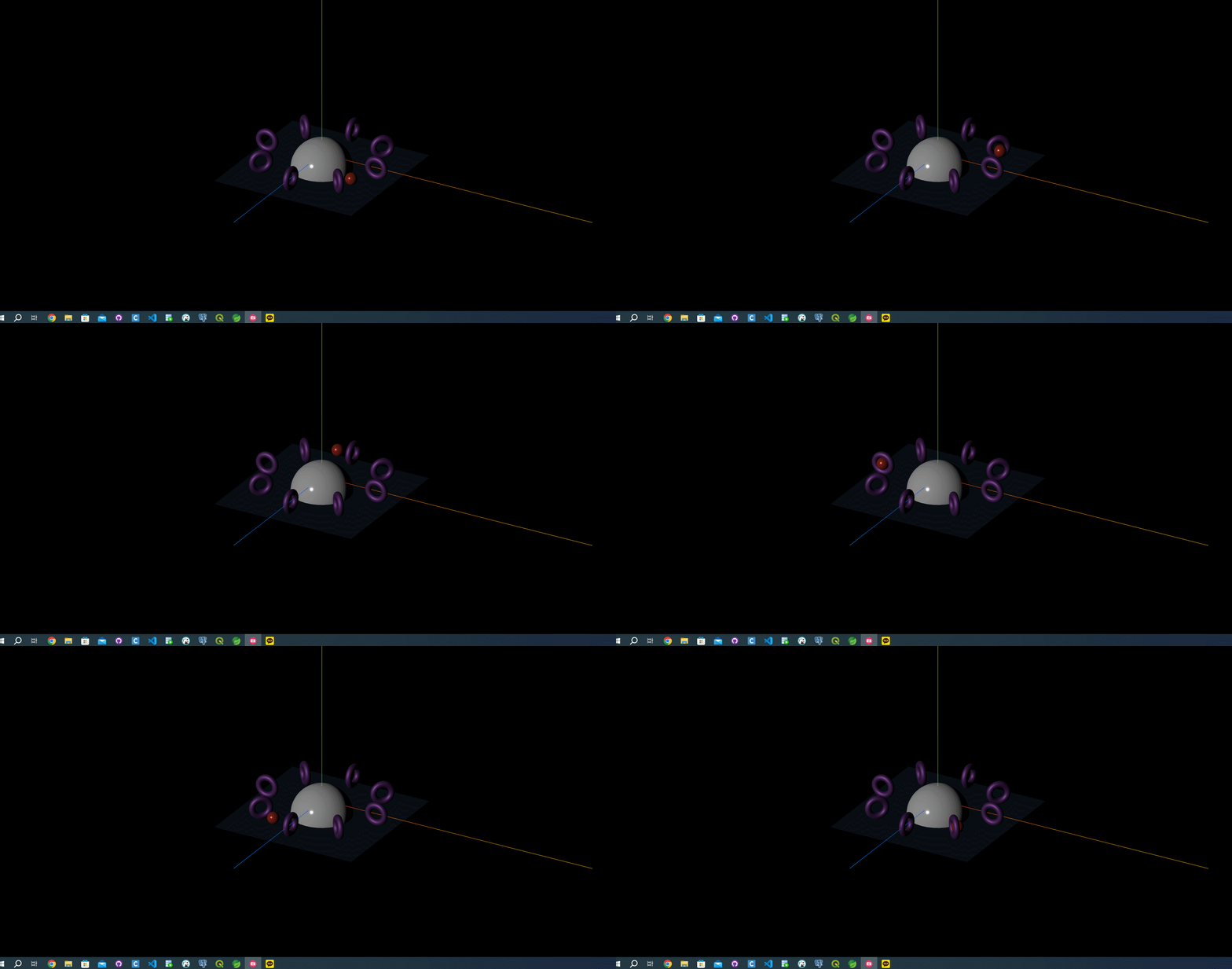
카메라가 더 먼 곳에서 렌더링 하여 모든 물체가 절두체 안으로 들어와 보이는 모습이다.
그러나 Perspective Camera와 다르게 원근감이 표시되지 않아, 멀리 있는 Torus와 가까이 있는 Torus의 크기가 같으며
회전하고 있는데 붉은색 구체(smallSphere) 역시 똑같은 크기로 보여지는 모습이다.
위와 같이 파라미터의 인자 값을 수정하는 방법 외에도 크기를 수정하는 방법이 있다.

기존의 코드에서 camera의 zoom 값을 5배 줄여준다.

인자 값으로 5배 늘린 값과 카메라의 줌을 5배 줄인 값이 동일한 결과를 도출해 냈다.
그리고 우리는 DOM 요소의 종횡비에 맞춰 절두체를 설정하였으므로
화면의 창 크기를 조절할 때 렌더링 역시 조절되도록 resize 함수를 수정해야 한다.
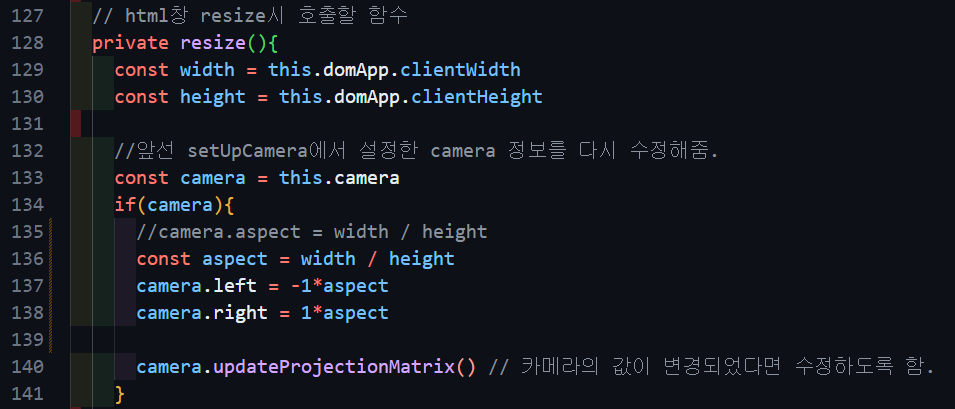
코드는 위와 같다.
Orthographic Camera는 Perspective Camera와 다르게 aspect를 지원하지 않는다.
인자값이 2개 더 많기 때문에, 이를 left, right 값으로 지정해 주는 코드를 resize에 추가해주어야 하며,
마찬가지로 updateProjectionMatrix 함수를 호출해야 한다.
지금까지 Three.js가 제공하는 Perspective Camera와 Orthographic Camera에 대해 알아보았다.
다음 글에서는 Camera를 응용한 코드에 대해 학습해 보자
전체 코드(main.ts)
import { OrbitControls } from 'three/examples/jsm/Addons.js'
import './style.css'
import * as THREE from 'three'

class App {
  private renderer: THREE.WebGLRenderer //Renderer Field 추가
  private domApp: Element
  private scene: THREE.Scene
  //private camera?: THREE.PerspectiveCamera //?를 붙이면 PerspectiveCamera Type이나 Undefined Type을 가질 수 있음.(Optional Properties)
  private camera?: THREE.OrthographicCamera //?를 붙이면 OrthographicCamera Type이나 Undefined Type을 가질 수 있음.(Optional Properties)

  constructor(){
    console.log("YooHwanIhn");
    this.renderer = new THREE.WebGLRenderer({antialias:true}) // 안티-알리아스 : 높은 렌더링 결과를 얻기 위해 픽셀 사이에 계단 현상을 방지하는 효과 추가
    this.renderer.setPixelRatio(Math.min(2, window.devicePixelRatio)) // 고해상도에서 깨짐 방지를 위해 픽셀 비율 지정

    this.domApp = document.querySelector('#app')!
    this.domApp.appendChild(this.renderer.domElement) // renderer.domeElement : canvas Type의 DOM 객체

    this.scene = new THREE.Scene()

    this.setupCamera()
    this.setupLight()
    this.setupModels()
    this.setupEvents()
  }

  private setupCamera(){
    const width = this.domApp.clientWidth
    const height = this.domApp.clientHeight


    const aspect = width / height
    this.camera = new THREE.OrthographicCamera(
      -1*aspect, 1*aspect,  // xLeft, xRight
       1, -1, // yTop, yBottom
        0.1, 100  // zNear, zFar
    )
    this.camera.zoom = 0.2

    this.camera.position.set(2, 2, 3.5)  // (2, 2, 3.5)

    this.camera.lookAt(new THREE.Vector3(0, 0, 0))

    //new OrbitControls(this.camera, this.domApp as HTMLElement)
  }

  private setupLight(){
    //빛의 색상 값과 빛의 강도
    const color = 0xffffff  // white
    const intensity = 1
    const light = new THREE.DirectionalLight(color, intensity)  //광원
    light.position.set(-1, 2, 4)

    this.scene.add(light)
  }

  private setupModels(){
    const axisHelper = new THREE.AxesHelper(10) // 좌표축
    this.scene.add(axisHelper)

    const geomGround = new THREE.PlaneGeometry(5, 5) // ground (5x5)
    const matGround = new THREE.MeshStandardMaterial({
      color: "#2c3e50",
      roughness: 0.5,
      metalness: 0.5,
      side: THREE.DoubleSide
    })
    const ground = new THREE.Mesh(geomGround, matGround)
    ground.rotation.x = -THREE.MathUtils.degToRad(90)
    ground.position.y = -.5
    this.scene.add(ground)

    const geomBigSphere = new THREE.SphereGeometry(1, 32, 16, 9, THREE.MathUtils.degToRad(360), 0, THREE.MathUtils.degToRad(90))
    const matBigSphere = new THREE.MeshStandardMaterial({
      color: "#ffffff",
      roughness: 0.1,
      metalness: 0.2
    });
    const bigSphere = new THREE.Mesh(geomBigSphere,matBigSphere)
    bigSphere.position.y = -.5
    this.scene.add(bigSphere)

    const geomSmallSphere = new THREE.SphereGeometry(0.2)
    const matSmallSphere = new THREE.MeshStandardMaterial({
      color: "#e74c3c",
      roughness: 0.2,
      metalness: 0.5
    })
    const smallSphere = new THREE.Mesh(geomSmallSphere, matSmallSphere)

    const smallSpherePivot = new THREE.Object3D();
    smallSpherePivot.add(smallSphere)
    bigSphere.add(smallSpherePivot);
    smallSphere.position.x = 2
    smallSpherePivot.rotation.y = THREE.MathUtils.degToRad(-45)
    smallSphere.position.y = 0.5 // bigSphere의 y position이 -.5기 때문에
    smallSpherePivot.name = "smallSpherePivot"  // update에서 접근하기 쉽게 명명함

    const cntItems = 8
    const geomTorus = new THREE.TorusGeometry(0.3, 0.1)
    const matTorus = new THREE.MeshStandardMaterial({
      color: "#9b59b6",
      roughness: 0.5,
      metalness: 0.9
    })
    for(let i=0; i<cntItems; i++){
      const torus = new THREE.Mesh(geomTorus, matTorus)
      const torusPivot = new THREE.Object3D() // Torus 역시 반 구를 기준으로 회전하면서 8개를 생성하기 때문에 피봇이 필요함
      bigSphere.add(torusPivot)

      torus.position.x = 2  // smallSphere의 x 포지션과 일치하게함
      torusPivot.position.y = 0.5 // bigSphere의 y 포지션이 -.5임
      torusPivot.rotation.y = THREE.MathUtils.degToRad(360) / cntItems * i
      torusPivot.add(torus)
    }
  }

  //실제 이벤트와 렌더링 처리를 다룰 메서드
  private setupEvents(){
    window.onresize = this.resize.bind(this); // html의 size가 변경될 때마다 호출되는 함수(addEventListener 느낌??)
    this.resize();

    this.renderer.setAnimationLoop(this.render.bind(this)) // 연속적으로 render 메서드 호출(모니터 Frame에 맞게)
  }

  // html창 resize시 호출할 함수
  private resize(){
    const width = this.domApp.clientWidth
    const height = this.domApp.clientHeight

    //앞선 setUpCamera에서 설정한 camera 정보를 다시 수정해줌.
    const camera = this.camera
    if(camera){
      //camera.aspect = width / height
      const aspect = width / height
      camera.left = -1*aspect
      camera.right = 1*aspect

      camera.updateProjectionMatrix() // 카메라의 값이 변경되었다면 수정하도록 함.
    }

    //renderer도 마찬가지로 사이즈 수정함
    this.renderer.setSize(width, height)
  }

  private update(time: number){
    time *= 0.001 // ms -> s 단위로 변경

    const smallSpherePivot = this.scene.getObjectByName("smallSpherePivot")
    if(smallSpherePivot){
      smallSpherePivot.rotation.y = time;
    }
  }

  private render(time: number){
    // time : setAnimationLoop의 값에 의해서 결정되는데 단위는 ms
    this.update(time)

    this.renderer.render(this.scene, this.camera!)
  }
}

new App()
'three.js' 카테고리의 다른 글
| [three.js][typescript] - Shadow(1) (0) | 2024.07.19 |
|---|---|
| [three.js][typescript] - Camera(3) (0) | 2024.07.18 |
| [three.js][typescript] - Camera(1) (1) | 2024.07.16 |
| [three.js][typescript] - Light(3) : HDRI (5) | 2024.07.16 |
| [three.js][typescript] - Light(2) (1) | 2024.07.16 |


